What’s New in FLARE v2.6.0
Message Quantization
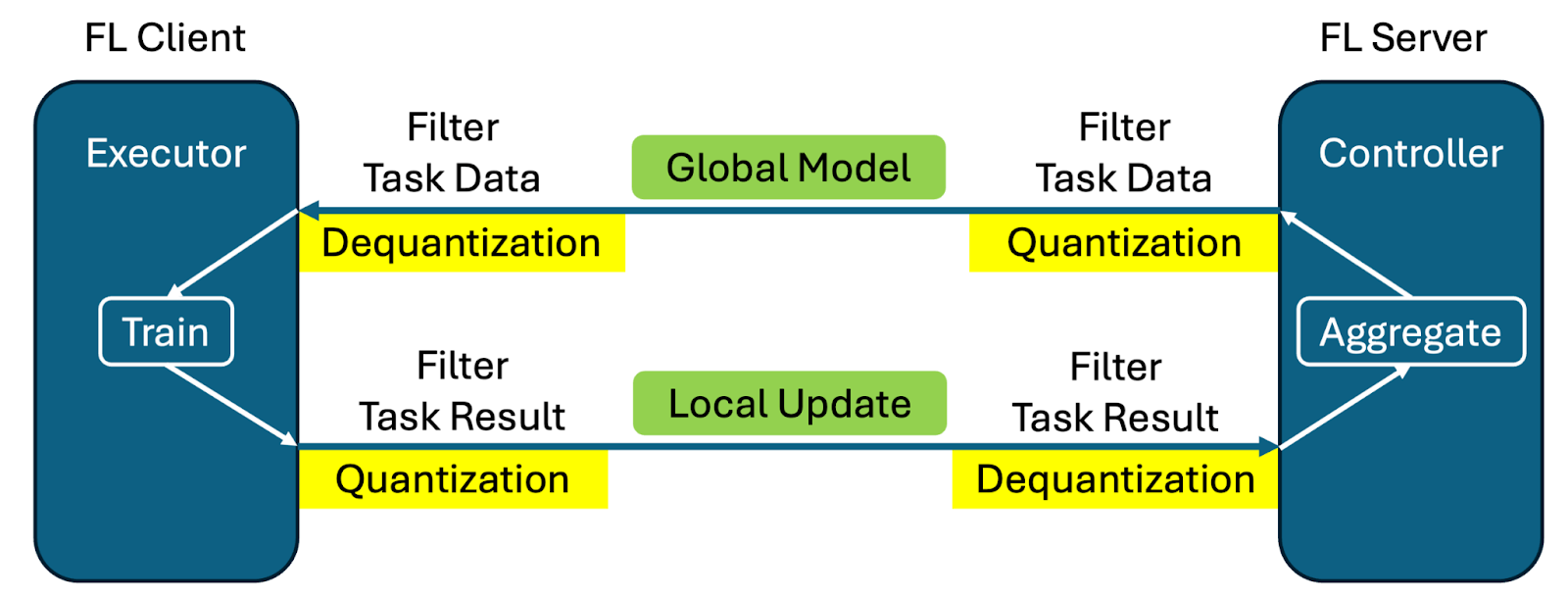
Message quantization offers a solution to reduce communication overhead in federated learning by reducing the precision of transmitted updates. This feature is particularly beneficial for large language models (LLMs) where the default fp32 message precision can artificially inflate message size. For more details, see Message Quantization.
- Key features:
Quantization and dequantization implemented with filter mechanism
No code changes required from user side - same training script works with/without quantization
Training and aggregation performed at original precision to minimize impact on training process
Support for both numpy arrays and torch Tensors
Direct cropping and casting for fp32 to fp16 conversion
8- and 4-bit quantization using bitsandbytes
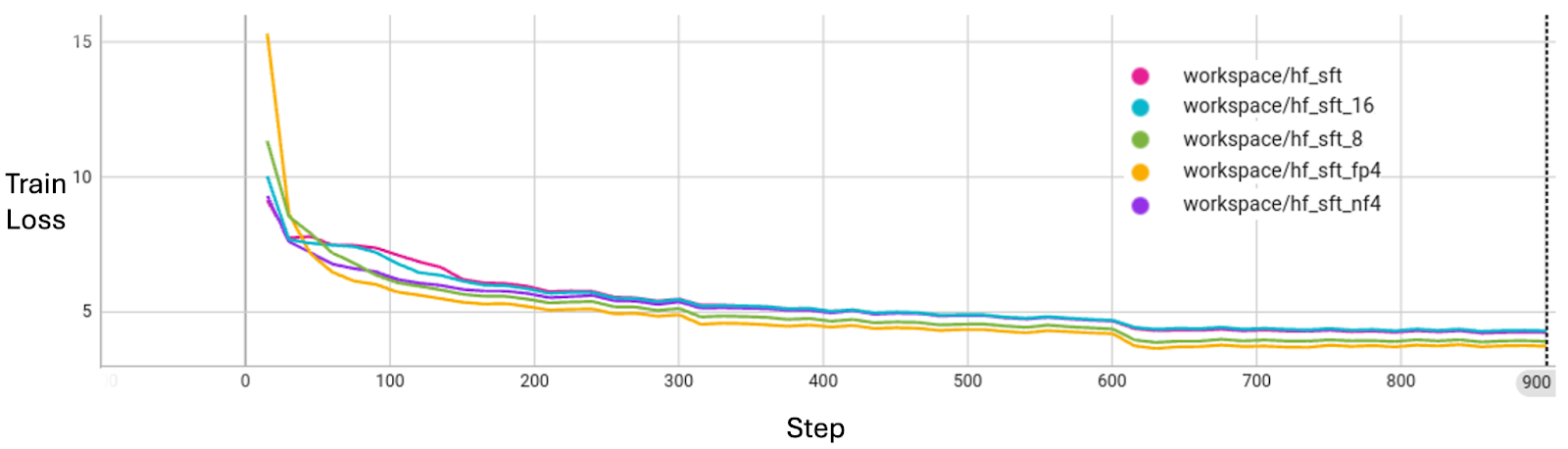
The table below illustrates the message size in MB for a 1B parameter LLM under different precisions. You can find more details regarding training loss curve alignments in the LLM example.
Precision |
Model Size (MB) |
Quantization Meta Size (MB) |
fp32 Size Percentage |
|---|---|---|---|
32-bit (fp32) |
5716.26 |
0.00 |
100.00% |
16-bit (fp16, bf16) |
2858.13 |
0.00 |
50.00% |
8-bit |
1429.06 |
1.54 |
25.03% |
4-bit (fp4, nf4) |
714.53 |
89.33 |
14.06% |
By applying message quantization techniques, FL can achieve significant bandwidth savings, and for training LLM with Supervised Fine-Tuning (SFT) in our experiments. As shown in the Figure below, message quantization does not sacrifice model convergence quality with regard to the training loss.
Native Tensor Transfer
FLARE 2.6.0 introduces support for native tensor transfer, allowing PyTorch tensors to be sent directly without serialization overhead. This eliminates the need for Tensor to Numpy conversion, preserving the original FPnn format. The feature is currently supported for PyTorch only.
Model Streaming Enhancements
Reduce Local Memory Usage
The new object container streaming feature processes and transmits models incrementally, rather than requiring the entire dictionary of gradients to be stored in memory at once. This significantly reduces memory overhead for large models. For more details, see ContainerStreamer.
- For example, a 70GB model with 1GB item-max:
Regular transmission: 70GB + 70GB = 140GB memory needed
Container streaming: 70GB + 1GB = 71GB memory needed
Support Unlimited Memory Streaming
File-based streaming is introduced to handle models larger than available memory. This feature reads files chunk-by-chunk, requiring only enough memory to hold one chunk of data. The memory usage is independent of model size and only depends on file I/O settings. For more details, see FileStreamer.
- Memory comparison for sending a 1B model:
Regular transmission: 42,427 MB peak memory, 47s completion time
Container streaming: 23,265 MB peak memory, 50s completion time
File streaming: 19,176 MB peak memory, 170s completion time
Note: Streaming enhancements are not yet integrated into high-level APIs or existing FL algorithm controllers/executors. Users can build custom controllers or executors to leverage this feature.
Structured Logging
- The structured logging feature addresses several customer concerns:
JSON format logging for data observability tools
Separation of training logs from communication logs
Dynamic log level changes for production debugging
Package-level hierarchy for granular control
- Key improvements:
Changed from fileConfig to dictConfig
The new FLARE Loggers are designed to follow the package level hierarchy using dot separated logger names in order to facilitate granular control at different levels
Default Logging Configuration file log_config.json.default for all NVFLARE sub-systems with pre-configured handlers for console level colors, logs, error logs, structured json logs, and fl training logs
Dynamic Logging Configuration Commands to allow dynamic change logging configuration without restarting the FL system
To support various needs and backward compatibility, we now have the following default log files: - log.txt: default log file from previous NVFLARE versions - log.json: JSON format log - error_log.txt: ERROR level logs to error_log.txt for quick error lookup - log_fl.txt: FL task-specific logs (removes the system and communication related logs and clearly shows logs related to FL tasks such as training)
Predefined logging modes for simulator: - Concise (default): only FL tasks logs - Full: previous logging configuration - Verbose: debug level logging
For details, please refer to logging tutorials and logging documentation.
Federated Statistics Extension
Quantiles Support: Introduces quantile computation for federated statistics, helping summarize data distribution by providing key points that indicate how values are spread. Quantiles divide a probability distribution or dataset into intervals with equal probabilities, providing insights into data distribution patterns. For more details, see Federated Statistics Overview.
System Monitoring
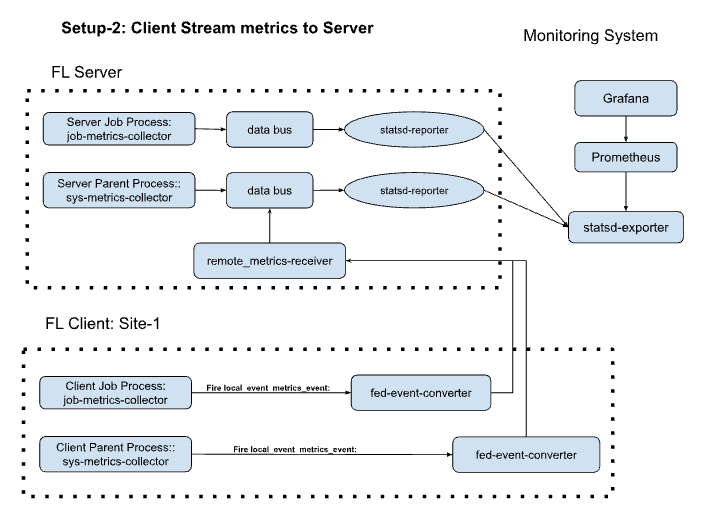
FLARE Monitoring provides system metrics tracking for federated learning jobs, focusing on job and system lifecycle metrics. It leverages StatsD Exporter to monitor FLARE job and system events, which can be scraped by Prometheus and visualized with Grafana. This differs from machine learning experiment tracking by focusing on system-level metrics rather than training metrics. For more information, see Monitoring.
Flower Integration v2
NVFlare has been updated to work with the latest Flower system architecture, which separates the client app from the supernode process. All user-facing functions remain the same. One benefit of this update is that job status information can be shared between the two systems more accurately.
This integration enables applications developed with Flower to run natively on the FLARE runtime without requiring any code modifications. By unifying Flower’s widely adopted, easy-to-use design tools and APIs with FLARE’s industrial-grade runtime, this integration simplifies the end-to-end deployment pipeline.
For more details on this integration, see our blog.
HTTP Driver Enhancement
The HTTP driver has been completely rewritten using aiohttp, significantly improving reliability and efficiency. The new implementation resolves previous issues with poor performance and network error recovery, matching the performance of GRPC and TCP drivers.
FLARE + BioNemo 2
NVFlare examples have been upgraded to use BioNeMo 2, enabling significant performance improvements on downstream tasks. The integrated BioNeMo ESM2 base models (650M) demonstrate notable gains in accuracy:
- Subcellular Localization (SCL) Prediction:
BioNeMo 1: 0.773 accuracy
BioNeMo 2: 0.788 accuracy
FL: 0.776 to 0.817 accuracy improvement
New Features
TensorBoard Metric Streaming Callback
Implemented a callback for PyTorch Lightning to stream training metrics to the FL server via NVFlare, allowing real-time visualization of training curves.
Downstream Task Fitting
Local Fine-Tuning tends to overfit, with training accuracy diverging from validation early. In contrast, Federated Averaging (FedAvg) models show continual performance improvement, highlighting the benefits of federated generalization over isolated training.
For more details, see our BioNeMo examples.
Tutorials and Education
- Self-paced-training tutorials covering:
Introduction to Federated Learning
Federated Learning System
Security and Privacy
Advanced Topics in Federated Learning
Federated Learning in Different Industries
New Examples
Federated Embedding Model Training
Object Streaming
System Monitoring
Distributed Optimization
Logging Tutorial
Migration to 2.6.0: Notes and Tips
In NVIDIA FLARE 2.6, several changes have been made to the Dashboard:
All API endpoints are now prefixed with
/nvflare-dashboard/api/v1/. For example, the login endpoint has changed from/api/v1/loginto/nvflare-dashboard/api/v1/login. This change affects all API calls to the dashboard backend. Update your client applications accordingly.The overseer and additional server for HA mode have been removed. The project configuration now only includes information about the main server.
The
FLARE_DASHBOARD_NAMESPACEconstant has been added to the codebase. All API endpoints should now use this namespace prefix.
FLARE 2.6.0 introduces a new server_expected_format parameter to enhance data exchange flexibility across the entire pipeline. This parameter is now available in: - ScriptRunner - ClientAPILauncherExecutor - InProcessClientAPIExecutor
## Previous Implementation Previously, data format was controlled by: - params_exchange_format in executors - framework in ScriptRunner
These parameters only defined the communication format between the NVFlare client and the user script. For example, setting params_exchange_format to “pytorch” meant the client communicated with the script using PyTorch tensors.
However, the server-to-client communication was always restricted to NumPy arrays.
With FLARE 2.6.0, we now support: 1. End-to-end PyTorch tensor pipeline 2. Flexible format specification at each communication boundary 3. Native PyTorch tensor transmission
The new server_expected_format parameter specifically controls the format used in server-client communication. When set to “pytorch”, the entire pipeline - from server to client to script - can operate using PyTorch tensors without any format conversion.
As part of sharing the chunk-protocol between FileStreamer and the new LogStreamer,
the Shareable keys for KEY_DATA, KEY_DATA_SIZE, KEY_EOF, and KEY_FILE_NAME
have been renamed from the "FileStreamer.*" namespace to the shared "Streamer.*"
namespace.
This is a breaking change on the wire: a sender and receiver running different NVFlare versions will not interoperate for file streaming, because the receiver will not find the expected keys in the incoming Shareable. NVFlare deployments must use the same version on both server and clients, so this does not affect supported configurations, but anyone performing a staged rollout must upgrade server and clients together.
Code that uses the public FileStreamer API (stream_file, get_file_name,
etc.) is unaffected. Only code that reads the raw stream_ctx keys by their string
values needs to be updated to use the new "Streamer.*" names (or, preferably, import
the KEY_* constants from nvflare.app_common.streamers.streamer_base).