Dashboard in NVIDIA FLARE
As mentioned in Provisioning in NVIDIA FLARE, the NVIDIA FLARE system requires a set of startup kits that include private keys and certificates (signed by the root CA) for secure communication between components. The NVFLARE Dashboard UI in NVIDIA FLARE provides a streamlined way to collect information about clients and users from different organizations, and to generate startup kits for users to download.
For detailed information about provisioning, refer to Provisioning in NVIDIA FLARE. This section focuses on user interaction with the Dashboard and its backend APIs.
Dashboard Command
Introduction to the Dashboard Command
The Dashboard command allows users to start the Dashboard in NVIDIA FLARE to provide a simple way to collect information of clients and users from different organizations and generate startup kits for users to download.
Syntax and Usage
Running nvflare dashboard -h shows all available options.
(nvflare_venv) ~/workspace/repos/flare$ nvflare dashboard -h
usage: nvflare dashboard [-h] [--cloud CLOUD] [--start] [--stop] [-p PORT]
                          [-f FOLDER] [--passphrase PASSPHRASE] [-e ENV]
                          [--cred CRED] [-i IMAGE] [--local]
                          [--vpc-id VPC_ID] [--subnet-id SUBNET_ID]

options:
-h, --help            show this help message and exit
--cloud CLOUD         launch dashboard on cloud service provider (ex:
                      --cloud azure or --cloud aws)
--start               start dashboard
--stop                stop dashboard
-p PORT, --port PORT  port to listen
-f FOLDER, --folder FOLDER
                      folder containing necessary info (default: current
                      working directory)
--passphrase PASSPHRASE
                      Passphrase to encrypt/decrypt root CA private key. !!!
                      Do not share it with others. !!!
-e ENV, --env ENV     additional environment variables: var1=value1
--cred CRED           set credential directly in the form of
                      USER_EMAIL:PASSWORD
-i IMAGE, --image IMAGE
                      set the container image name (required for --start
                      and --cloud)
--local               start dashboard locally without docker image
--vpc-id VPC_ID       VPC id for AWS EC2 instance. Applicable to AWS only.
                      Ignored if subnet-id is not specified.
--subnet-id SUBNET_ID
                      Subnet id for AWS EC2 instance. Applicable to AWS
                      only. Ignored if vpc-id is not specified.
Note
The -i/--image option is required when starting Dashboard with Docker or launching Dashboard
on cloud. It is not required for --stop or --local.
For AWS cloud launches, specify --vpc-id and --subnet-id together.
If only one of these options is provided, Dashboard ignores it.
To start Dashboard, run nvflare dashboard --start -i nvflare/nvflare:2.7.2.
The image is a standard container image reference and can come from any registry that the runtime can pull from,
for example nvflare/nvflare:2.7.2, nvcr.io/nvidia/nvflare:2.7.2, or
registry.example.com/nvflare/nvflare:2.7.2. Different deployments can use image names from different
registries as long as each Docker host or cloud VM has pull access.
The Dashboard Docker will detect if the database is initialized. If not, it will ask for the project_admin email address and will generate a random password:
Please provide project admin email address.  This person will be the super user of the dashboard and this project.
project_admin@admin_organization.com
generating random password
Project admin credential is project_admin@admin_organization.com and the password is EXAMPLE1
Please log in with this credential to finish setting up the project in Dashboard once the system is up and running. The project_admin can change his/her password in the Dashboard system after logging in.
Note that for the first time, it may take a while to download the nvflare image as you see the prompt:
Pulling nvflare/nvflare:2.7.2, may take some time to finish.
After pulling the image, you should see output similar to the following:
Launching nvflare/nvflare:2.7.2
Dashboard will listen to port 443
/path_to_folder_for_db on host mounted to /var/tmp/nvflare/dashboard in container
No additional environment variables set to the launched container.
Dashboard container started
Container name nvflare-dashboard
id is 3108eb7be20b92ab3ec3dd7bfa86c2eb83bd441b4da0865d2ebb10bd60612345
We suggest you to set the passphrase to protect the private key of the root CA by using the --passphrase option. Once it’s set, you have to provide the same passphrase everytime you
restart Dashboard for the same project.
If you would like to start a new project, please remove the db.sqlite file in current working directory (or the directory set with the --folder option). Dashboard will start
from scratch and you can provide a project admin email address and get a new password for the project_admin.
The Dashboard will also check the cert folder inside current the working directory (or directory specified by the –folder option) to load web.crt and web.key.
If those files exist, Dashboard will load them and run as an HTTPS server. If Dashboard does not find both of them, it runs as HTTP server. In both cases, the service
listens to port 443, unless the --port option is used to specify a different port. Dashboard will run on 0.0.0.0, so by default it should be accessible on the same machine from
localhost:443. To make it available to users outside the network, port forwarding and other configurations may be needed to securely direct traffic to the machine running Dashboard.
Note
Running Dashboard requires Docker. You have to ensure your system can pull and run Docker images. The initial docker pull may take some time depending on your network connection.
To stop the running Dashboard, run nvflare dashboard --stop.
NVIDIA FLARE Dashboard Backend APIs
Architecture
The Dashboard backend APIs follow RESTful principles and define four main resources: Project, Organizations, Client, and User. There is exactly one Project per deployment, which includes information about the server. Clients represent NVIDIA FLARE client instances, while Users represent NVIDIA FLARE admin console users. The Organizations endpoint is a read-only operation that returns a list of currently registered organizations.
Details
APIs
The following OpenAPI 3.0 document describes the Dashboard backend APIs.
All Dashboard API endpoints are prefixed with /nvflare-dashboard/api/v1/. For example,
the login endpoint is /nvflare-dashboard/api/v1/login.
openapi: "3.0.0"
info:
description: "This is the api definition for nvflare user/client registration, state update and other management functions."
version: 0.0.1
title: FLARE Participant Registration and Management
contact:
email: "nvflare@nvidia.com"
license:
name: Apache 2.0
servers:
- url: http://localhost:8443/nvflare-dashboard/api/v1
paths:
/login:
post:
summary: "Login and retrieve JWT"
description: ""
operationId: "login"
requestBody:
required: true
content:
application/json:
schema:
type: "object"
properties:
email:
type: "string"
example: "hello@world.com"
password:
type: "string"
example: "1234"
responses:
"200":
description: Login OK
content:
application/json:
schema:
type: "object"
properties:
status:
type: "string"
user:
type: "object"
properties:
id:
type: "string"
email:
type: "string"
role:
type: "string"
access_token:
type: "string"
"401":
description: Unauthorized
content:
application/json:
schema:
type: "object"
properties:
status:
type: "string"
/project:
patch:
security:
- bearerAuth: []
summary: "Set the project"
description: ""
operationId: "patch_project"
requestBody:
required: true
content:
application/json:
schema:
$ref: '#/components/schemas/Project'
responses:
"200":
description: Project patched
content:
application/json:
schema:
type: "object"
properties:
status:
type: "string"
project:
$ref: '#/components/schemas/Project'
"403":
description: Forbidden
content:
application/json:
schema:
type: "object"
properties:
status:
type: "string"
get:
summary: Get project
operationId: get_project
responses:
"200":
description: API accepted
content:
application/json:
schema:
type: "object"
properties:
status:
type: "string"
project:
$ref: '#/components/schemas/Project'
/servers/{id}/blob:
post:
security:
- bearerAuth: []
summary: "Get server startup kit"
operationId: "get_server_blob_by_id"
parameters:
- name: "id"
in: "path"
description: "The id that needs to be fetched."
required: true
schema:
type: "string"
requestBody:
required: true
content:
application/json:
schema:
type: "object"
properties:
pin:
type: string
responses:
"200":
description: API accepted
content:
application/zip:
schema:
type: "string"
format: "binary"
"403":
description: Forbidden
content:
application/json:
schema:
type: "object"
properties:
status:
type: "string"
/organizations:
get:
summary: Get a list of all organization names
operationId: get_orgs
responses:
"200":
description: API accepted
content:
application/json:
schema:
type: "object"
properties:
status:
type: "string"
org_list:
type: array
items:
type: "string"
"403":
description: Forbidden
content:
application/json:
schema:
type: "object"
properties:
status:
type: "string"
/clients:
post:
security:
- bearerAuth: []
summary: "Add a new client entity to the study"
description: ""
operationId: "add_client"
requestBody:
required: true
content:
application/json:
schema:
$ref: '#/components/schemas/BaseClient'
responses:
"201":
description: Resource created
content:
application/json:
schema:
type: "object"
properties:
status:
type: "string"
client:
$ref: '#/components/schemas/RspClient'
get:
security:
- bearerAuth: []
summary: Get a list of all clients
operationId: get_clients
responses:
"200":
description: API accepted
content:
application/json:
schema:
type: "object"
properties:
status:
type: "string"
client_list:
$ref: '#/components/schemas/ListOfClients'
"403":
description: Forbidden
content:
application/json:
schema:
type: "object"
properties:
status:
type: "string"
/clients/{id}:
patch:
security:
- bearerAuth: []
summary: "Update items of one client by ID"
description: "Return updated client"
operationId: "update_client_by_id"
parameters:
- name: "id"
in: "path"
description: "id that need to be updated"
required: true
schema:
type: "string"
requestBody:
required: true
content:
application/json:
schema:
$ref: "#/components/schemas/BaseClient"
responses:
"200":
description: API accepted
content:
application/json:
schema:
type: "object"
properties:
status:
type: "string"
client:
$ref: '#/components/schemas/RspClient'
"403":
description: Forbidden
content:
application/json:
schema:
type: "object"
properties:
status:
type: "string"
get:
security:
- bearerAuth: []
summary: "Find client by ID"
description: "Returns a single pet"
operationId: "find_client_by_id"
parameters:
- name: id
in: path
required: true
schema:
type: "string"
responses:
"200":
description: API accepted
content:
application/json:
schema:
type: "object"
properties:
status:
type: "string"
client:
$ref: '#/components/schemas/RspClient'
delete:
security:
- bearerAuth: []
summary: "Deletes a client"
description: ""
operationId: "delete_client"
parameters:
- name: id
in: path
required: true
schema:
type: "string"
responses:
"200":
description: API accepted
content:
application/json:
schema:
type: "object"
properties:
status:
type: "string"
"403":
description: Forbidden
content:
application/json:
schema:
type: "object"
properties:
status:
type: "string"
/clients/{id}/blob:
post:
security:
- bearerAuth: []
summary: "Get client startup kit"
operationId: "get_client_blob_by_id"
parameters:
- name: "id"
in: "path"
description: "The id that needs to be fetched."
required: true
schema:
type: "string"
requestBody:
required: true
content:
application/json:
schema:
type: "object"
properties:
pin:
type: string
responses:
"200":
description: API accepted
content:
application/zip:
schema:
type: "string"
format: "binary"
"403":
description: Forbidden
content:
application/json:
schema:
type: "object"
properties:
status:
type: "string"
/users:
post:
summary: "Create user"
description: "Create a user registration."
operationId: "create_user"
requestBody:
required: true
content:
application/json:
schema:
$ref: '#/components/schemas/RqsUser'
responses:
"201":
description: Resource created
content:
application/json:
schema:
type: "object"
properties:
status:
type: "string"
client:
$ref: '#/components/schemas/RspUser'
get:
security:
- bearerAuth: []
summary: "Get all users"
description: ""
operationId: "get_users"
responses:
"200":
description: API accepted
content:
application/json:
schema:
type: "object"
properties:
status:
type: "string"
client_list:
$ref: '#/components/schemas/ListOfUsers'
"403":
description: Forbidden
content:
application/json:
schema:
type: "object"
properties:
status:
type: "string"
/users/{id}:
get:
security:
- bearerAuth: []
summary: "Get user by user id"
operationId: "get_user_by_id"
parameters:
- name: "id"
in: "path"
description: "The id that needs to be fetched."
required: true
schema:
type: "string"
responses:
"200":
description: API accepted
content:
application/json:
schema:
type: "object"
properties:
status:
type: "string"
client:
$ref: '#/components/schemas/RspUser'
"403":
description: Forbidden
content:
application/json:
schema:
type: "object"
properties:
status:
type: "string"
patch:
security:
- bearerAuth: []
summary: "Updated user"
description: "This can only be done by the logged in user."
operationId: "update_user"
parameters:
- name: "id"
in: "path"
description: "id that need to be updated"
required: true
schema:
type: "string"
requestBody:
required: true
content:
application/json:
schema:
$ref: "#/components/schemas/RqsUser"
responses:
"200":
description: API accepted
content:
application/json:
schema:
type: "object"
properties:
status:
type: "string"
client:
$ref: '#/components/schemas/RspUser'
"403":
description: Forbidden
content:
application/json:
schema:
type: "object"
properties:
status:
type: "string"
delete:
security:
- bearerAuth: []
summary: "Delete user by user id"
operationId: "delete_user_by_id"
parameters:
- name: "id"
in: "path"
description: "The id that needs to be deleted."
required: true
schema:
type: "string"
responses:
"200":
description: API accepted
content:
application/json:
schema:
type: "object"
properties:
status:
type: "string"
/users/{id}/blob:
post:
security:
- bearerAuth: []
summary: "Get user startup kit"
operationId: "get_user_blob_by_id"
parameters:
- name: "id"
in: "path"
description: "The id that needs to be fetched."
required: true
schema:
type: "string"
requestBody:
required: true
content:
application/json:
schema:
type: "object"
properties:
pin:
type: string
responses:
"200":
description: API accepted
content:
application/zip:
schema:
type: "string"
format: "binary"
"403":
description: Forbidden
content:
application/json:
schema:
type: "object"
properties:
status:
type: "string"
components:
securitySchemes:
bearerAuth: # arbitrary name for the security scheme
type: http
scheme: bearer
bearerFormat: JWT # optional, arbitrary value for documentation purposes
schemas:
Project:
type: "object"
properties:
frozen:
type: boolean
public:
type: boolean
short_name:
type: "string"
example: "EXAM"
title:
type: "string"
example: "International project to detect COVID on medical images with Federated Learning"
description:
type: string
app_location:
type: string
server1:
type: "string"
starting_date:
type: "string"
end_date:
type: "string"
BaseUser:
type: "object"
required:
- organization
- email
properties:
name:
type: "string"
organization:
type: "string"
email:
type: "string"
role:
type: "string"
enum: ["user", "org_admin", "proj_admin"]
approval_state:
type: "integer"
format: "int32"
description: "User approval state"
RqsUser:
allOf:
- $ref: '#/components/schemas/BaseUser'
- type: "object"
properties:
password:
type: "string"
RspUser:
allOf:
- $ref: '#/components/schemas/BaseUser'
- type: object
properties:
id:
type: "integer"
format: "int64"
BaseClient:
type: "object"
required:
- name
- organization
properties:
name:
type: "string"
example: "site-1"
organization:
type: "string"
example: "nvidia"
capacity:
type: "object"
properties:
num_gpus:
type: "integer"
format: "uint8"
mem_per_gpu_in_GiB:
type: "integer"
format: "uint8"
approval_state:
type: "integer"
format: "int64"
RspClient:
allOf:
- $ref: '#/components/schemas/BaseClient'
- type: object
properties:
id:
type: "integer"
format: "int64"
ListOfClients:
type: array
items:
$ref: '#/components/schemas/RspClient'
ListOfUsers:
type: array
items:
$ref: '#/components/schemas/RspUser'
externalDocs:
description: "Find out more about Swagger"
url: "http://swagger.io"
Project Freezing
Making the project public enables the Sign Up flow in the Dashboard web interface. After finalizing the project and server configuration, the project_admin freezes the project to enable startup kit downloads and make the configuration immutable. Once frozen, the project cannot be unfrozen through the Dashboard web interface.
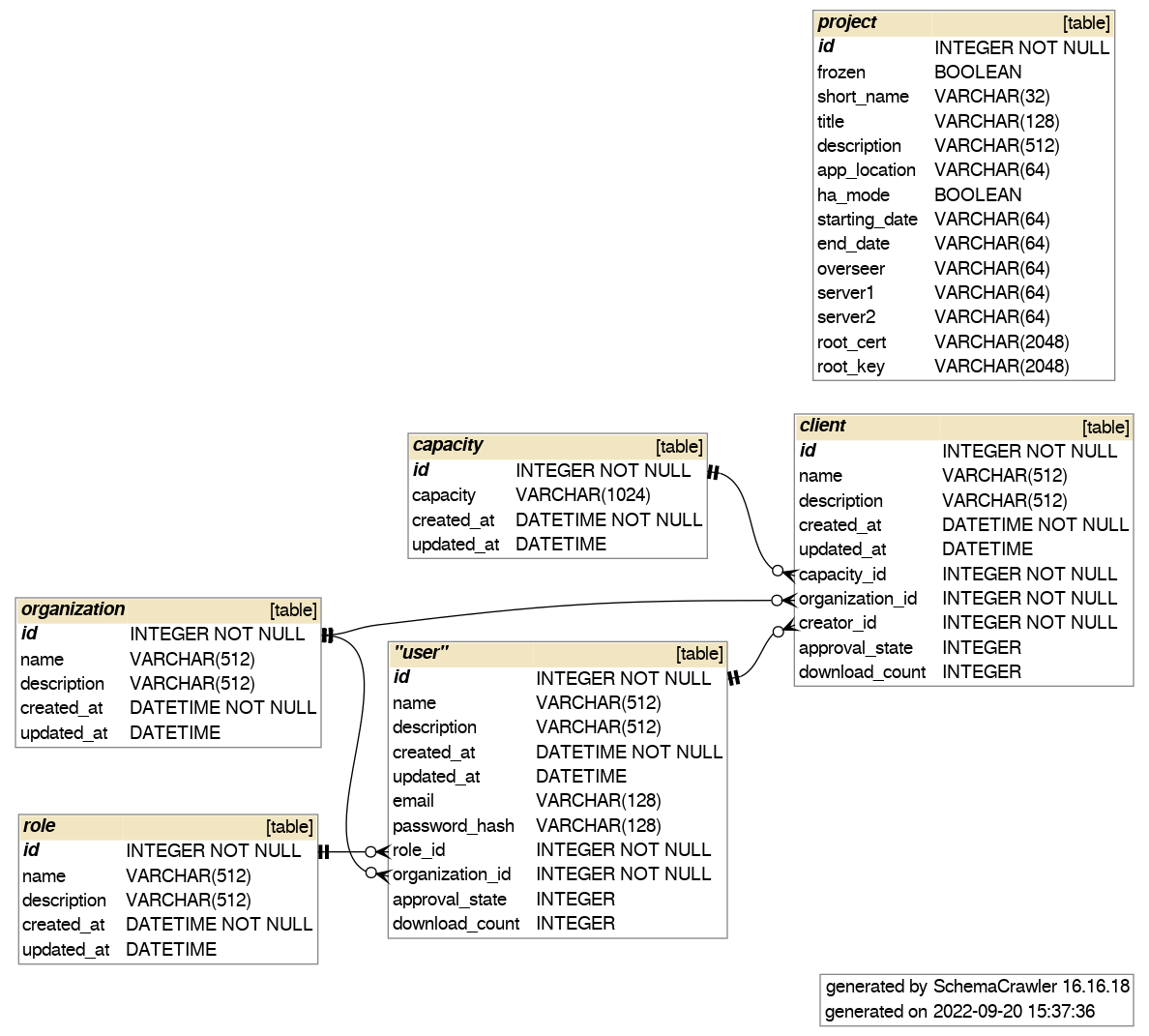
Database Schema
The following diagram illustrates the schema of the underlying database used by the backend APIs: